Showing posts with label apps. Show all posts

Thursday, July 10, 2014

Making The Best App Choices With @Graphite

When I was beginning to roll out a Bring Your Own Device initiative in my previous district we spent a great deal of time sitting and talking with teachers. There are many misconceptions and questions that arise when we allow students to use their own technology in the classroom, so I wanted to make sure we addressed those right away so we could focus on the learning and not the classroom management.

10 times out of 10 the question came up, how could they find new and exciting tools, apps and sites to use with their students but still ensure they were effective and meeting their curriculum goals?

At the time the answer was an elusive one. Our Instructional Technology program had done a lot of front loading and cataloged many of our favorite apps and sites and tried to align them. But we knew that is a loosing battle as new tools are added and created everyday. 

Now teachers don't have to look across the Internet for the answer. 

Our friends at Common Sense Media have created Graphite

Graphite is an amazing site with loads of app and website resources for any classroom. 


It really breaks down into 4 different areas:

Ratings And Reviews-This is the heart of the Graphite site. Looking for information on a specific app or website? Maybe you don't know either and you are looking for suggestions. This is the place to go. You can filter all the site has to offer by type of resource (app or website or even console game like Playstation), grade level, subject area or cost. Once you find a resource you want to investigate you get a page full of helpful information. Screenshots, Graphite and Teacher reviews (which are super helpful), pros and cons of using the resource it's all there to help you make an informed decision on the best resources to use in your classroom. 

The best feature I think is the Learning Score. Broken down into Engagement, Pedagogy and Support, this is where the Graphite rating comes from. Reviewers look at the resource and score it against a rubric in those three areas. As a teacher you get a good idea of how the resource will work in your classroom and support learning. 

Top Picks-This section is just that, the top tools, apps and sites. But it's not just a listing. They are broken down into areas like Top Tools For Remixing or Tools For Teaching And Learning About Diversity. There are loads of these topic areas and they change all the time so you will definitely want to come back and see whats new and exciting. 

Common Core Explorer-For many teachers following the Common Core Standards is a reality. Finding technology resources to support the Common Core can be a challenge. In this section you can drill into your specific set of Common Core Standards for Language Arts or Math. There you can find educator reviewed technology tools to help you teach those standards.

Teacher Center-This section is full of helpful resources for using apps and websites in the classroom. Start with the Getting Started section to see the videos for using the different parts of the Teacher Center. 

Then spend some time with App Flows. Starting with a standard lesson plan template, App Flows help you look at the different parts of your lesson to see if technology fits there and what type of technology works there. For teachers who need help understanding the role technology has in learning, App Flows can really help. There is a large community as well so you can see the other App Flows that have been created. 

Lastly you can check out the Appy Hour videos and sign up for the next one. Done through Google Hangouts, you can join live or see the recording of how various, popular apps are being used in the classroom. 

I am a big fan of what Common Sense Media has created with Graphite. Its a fabulous resource for helping teachers in 1:1, BYOD or any classroom better use technology for teaching and learning. 

Head over to Graphite and see all it has to offer!


Friday, April 18, 2014

Things That Have Me Thinking-4/18

This is my series where I explore a few things that I have seen or heard about that is pushing my thinking, getting me to see something a different way or just something I want to share. This week we look at the 3 things about apps I've been exploring.

Field Day- I have been doing a lot of work lately investigating and helping teachers learn what authentic-based learning means. In a sense, its providing real-world problems that mean something to students, aligned to standards. One way we’ve been doing that in classrooms for a while now is Problem-Based Learning (PBL). Now, with the proliferation of mobile devices into classrooms there could be a true renaissance in learning. There is no doubt that the mobile devices can help with PBL but often students are using many apps to organize and create content.

Enter Field Day.

This app is specifically designed with PBL in mind. It provides a space for kids to organize their ideas, enter data through a variety of sources (web, photos, etc) and a summary so making presentations is quick and easy. My favorite part is the strategies section that helps students get going with their thinking and it’s aligned to Blooms Taxonomy. Even better the app is free so it makes it easy to get it going in your classroom.

Codding- It seems like many of the conferences I got to lately have specific sessions or strands dedicated to teaching kids how to code. And thats a good thing. Coding teaches so many crucial skills like critical thinking, math reasoning, artistic design and more. There is even a whole movement dedicated to get kids coding and see its not just nerds in dark rooms writing gibberish on the black screen. And again, with mobile devices becoming more and more prevalent in the classroom, coding is becoming easier to integrate into any curriculum.

CodeAcademy is one of my favorite and addictive apps. The app is simple, teaching coding and HTML in a few basic steps. At the end you have a webpage that you built from scratch, through coding you can share.

Daisy The Dinosaur-For our littlest coders, Daisy is designed to show kids how different coding actions do different things. Creating strings of commands, kids can make Daisy do all sorts of things.  

Cargo-Bot- This is another one I am having trouble putting down. Its a game, but through the game you learn the effects programming have on your potential outcomes. The goal is to follow the commands to do something with a crate. By putting together strings of commands you make the crane do things like pick up, move, toss, etc. Each level gets progressively more difficult but you really get a grasp for the power of programming.

Where To Find Apps- As we’ve seen there are some really great apps out there to learn all sorts of things, organize all sorts of things or to just have fun. While the cream usually rises to the top, what about the hidden gems in the App Store? How do you find the good stuff or weed out the bad?

Teachers With Apps-This site is one of my first stops when looking for apps. Organized by category its really easy to find reviews, information and more on the apps teachers are using in their classrooms. The blog posts are great too, helping find collections to recommend to teachers.

TCEA iPad Apps-This doc, organized by content area is constantly updated with iPad apps. There are sections for administrators, special needs and stuff thats just plain fun too.

Android4Schools-iPads aren’t the only devices out there. Many districts have Android devices. Richard Byrne of Free Technology For Teachers fame created a site to highlight good Android apps to use in the classroom. Loads of good stuff here.

So that is the stuff that has me thinking. What about you? What are you thinking about this week?

Wednesday, February 26, 2014

Favorite Apps For Learning On The Go

I spend a great deal of time on the go. From working with all the schools in my district to traveling to far off lands to work with teachers, I sometimes feel like I am disconnected from my learning. And that bums me out!

There are a few apps (and some sites too) that I rely upon to keep me updated with whats happening and to teach a me a thing or two as well.

Here are a few of my favorites.

Zite-A lot of folks reading this have probably heard of Zite. But just in case you haven't, Zite is a curated magazine type app that delivers content to you based on your interests and feedback. When you create an account the app asks a couple of questions about what you'd like to see. They have thousands of sources so just a few key words and you will be greeted with hours of reading and learning. You can also choose to bring in your social feeds from Twitter and Facebook too to further the reach. I have a couple Education phrases along with Leadership and some technology stuff as well.

Flipboard-Similar to Zite, Flipboard looks and feels like more of a magazine. You can subscribe to your favorite sites with a simple search (or RSS feed address) and you can search what others are curating too. I will often times go into Flipboard and do searches to see what others are reading. That really helps me expand my learning. One board you will want to check out is FieldFlips from AnEstuary.com. They have lots of great education topics curated for you.

Podcast App-The popularity of podcasts seems to come and go. A few years ago loads of folks were listening and creating their own. Then the excitement seemed to wane but now they are on the rise again. I like hitting up the Podcast store in iTunes and seeing whats new in the Education, News or Tech categories. I can be walking through an airport but still feel like I am learning something new. #Edchat has its own podcast where you can hear a break down of that week's chat. But I also like the NPR Technology podcast and one of my favorites is the Get-It-Done Guy, which is full of short productivity and life hacking tips.

Lifehacker-Speaking of life hacking, I am a huge fan of Lifehacker. While it isn't an app, it is a pretty awesome website with tons of advice for, well, hacking your life. They have everything from design tips for presentations, to ideas for cutting the cord from cable or satellite, to what to do when you don't feel like working any more. I can always spend 5-10 minutes (but most of the time, way more) there and learn something pretty neat.

TED Talks-I've written about the power of TED talks before and their app is no different. All of the talks are available there along with short spinets which are great when you don't have the time to watch a full talk.

Twitter-Of course I have to list Twitter. But when I am on the go I spend a lot of time with Lists. Lists help me organize tweets into specific categories. So I have a list for tweeters I don't want to miss, policy folks, funny twitterers, etc. Lists are a great way to not feel like you have to be tied to Twitter all the time.

There are lots of options out there to keep up with learning. What are some of your favorites? Leave some suggestions below.

Happy learning!

photo credit: Daniel Y. Go via photopin cc

Monday, October 21, 2013

Quick List of Apps For Learners And Curators

When it comes to mobile learning there are loads of great sites for apps for kids and teachers. Everything from apps organized by Revised Bloom’s Taxonomy to apps organized by grade level and subject area. It can be daunting to sort through all those apps to find the special ones for learning something new or curating information. 

What are they? Well my friend, here are my Top 10 Apps For Learners and Curators

(All of these are for iPad but you can find many, or an equivalent, in the Android Market as well)

1) Google Drive-Where would I be without Google Drive and Google Docs? Lost I am sure. My life is spent editing and creating documents, presentations and spreadsheets. And the ability to share those easily makes Google Docs my go-to app for editing, not only at the computer but on the go as well. I can edit, comment and view all my documents from this app, no matter where I am.

2) Dropbox-For those items I can’t keep in Google Docs, I use Dropbox. The app gives you access to all your files stored in the cloud so you can retrieve them, email them, view them, and show them, again, no matter where you are.

3) Adobe Ideas- You never know when a great idea is going to strike. Adobe Ideas is always at the ready to capture a drawing, sketch, list or what ever you need.

4) Pocket-I am a huge, huge fan of this app. Whenever you are reading a blog or come across a webpage that you just don’t have time to check out or don’t want to save it to your booksmarks before you have a chance to look at it, you can Pocket. Adding items to your list is easy as a checkmark in the address bar and the app gives you online and offline access to your entire list.

5) Diigo-Once you read all those saves in your pocket app, you need a way to curate them and retrieve them later. Diigo is that tool. Add to your library, tag and save. You can do everything from the app. Oh and you get the highlighter and clipping functions too. I use this one a lot from my tablets simply because I can curate anywhere I happen to be. 

6) Google Hangouts-I like having an office, because I can duck in there and shut the door and get some work done. But let's face it, out in the world is where we should be. Google Hangouts lets me untether myself from my office and have a meeting, learning session or just conversation anywhere. The ability to video chat with up to 9 other folks is a big advantage and we can document share, desktop share and more. The best part? I am mobile so I can do it from anywhere and still take part in the learning!

7) Zite-This is a Social Aggregator that takes topics you decide and pulls the most relevant stories related to those topics. They are then presenting and a pretty neat magazine format. And you can share what you read via Twitter, Facebook and email. So you can keep up with topics in education and share them with ease.

8) Google Translate-In many of our schools English might not be the main language spoken. The Google Translate app is great for helping to break the language barrier with students and staff and you can put in text and get instant translations for emails and documents. And, you might just be able to teach yourself too. 

9) TED-These are inspiring talks given from some of the brightest minds on the planet. This app gives you access to the entire directory. You can use the TED talks build morale and challenge the thinking of your staff and students.

10) Dragon Dictation-Let’s face it, sometimes typing on the iPad can be challenging. Dragon Dictation does it all for you. Using the built-in mic you can dictate memos, documents, blog posts and more.

There are loads more apps out there for all different sorts of uses. Check out this post to learn more about how you can get more mileage out of your mobile learning device. 

What are your favorite apps for learning and curating. Leave some suggestions in the comments below!

photo credit: Kalexanderson via photopin cc

Tuesday, September 11, 2012

Apps That Teach! (And Might Be Fun Too..)

I get asked a lot what are my favorite apps. And I usually can rattle off a few. Evernote, Twitter, Wunderlist to name a few. But what about apps that actually teach? What about apps that kids (or you) can use to learn?

I have a few teachers in my district working on a 1:1 tablet project and we are going to be introducing some apps in a few weeks that are fun but have a purpose. Many of these are STEM apps (as STEM is a big focus for us this year) but they could be used in lots of places.

Angry Birds: (iOS, Android) Yep. You read that right. Angry Birds. While totally addictive and fun to play, there is loads of learning potential. Physics, angles and more. We could stretch it and do estimation (How many birds will this take me), evolution and how different characteristics of the birds affect game play. Even writing. (Here is a great series of physics questions to answer using Angry Birds, no tablet or phone needed.)

Plants vs. Zombies (iOS, Android) Another fun and addictive game, Plants vs. Zombies is great for the science classroom, mainly looking at adaptations and evolutionary concepts. But there is some math with estimations and predictions. Even conversations around habitats. See, Zombies can be fun!

Plague Inc (iOS) Epidemic (Android) Wanna destroy humankind? Can you create superbug that will end civilization as we know it? Of course you can't for real (unless you are a Mad Scientist or something) but in Plague and Epidemic that is precisely what you do. Chose your method of infection (bacteria, virus, etc) and infect populations. Spread your disease, changing the infection methods, symptoms and resistance as you go. If that isn't fun science I don't know what is!

Move The Turtle (iOS) A fun and simple app, the objective here is to learn programming. You can practice using a variety of easy-to-learn commands that will make your turtle do just about anything.

Cargo-Bot (iOS) Another programming game however, in this one the goal is to program a robot to move boxes into specific patterns. In the beginning its quite easy to master but as you progress through the levels you learn harder and harder techniques for making your robot do your bidding.

Alge-Bingo (iOS) Algebra and Bingo? They do mix. And they can be fun. In order to fill in your card, users have to complete simple to complex algebra problems.

Math Ninja- (iOS, Android) Another math practice app. Here the objective is to lead your ninja to defend your treehouse against the evil tomatoes. But watch out! Those tomatoes can be sneaky!

Simple Physics- (iOS, Android) You know you have always wanted to design your own roller coaster, ferris wheel or tree house. Now you can. And they will be physically accurate. So design way, but be careful. Physics can be fun but dangerous too.

Those are some of my favorites. What are some of yours? What games do you use to teach and learn with. Leave your ideas in the comments below.

photo credit: SamCheong via photo pin cc

Tuesday, May 22, 2012

Android Apps For Literacy

I love my tablets. I carry 2 pretty much where ever I go, especially when I travel. Now, I love my iPad. I can get lots of work done on it, but mostly play some great games. However, I recently got a 10.1 Galaxy Tab and it is quickly becoming my go-to tablet for everything. From writing this blog post to checking my tweets to watching Netflix, I use it more than my laptop some days. 

But I am finding more and more that I pick it up before I pick up my Kindle. Normally I am reading 4-5 books at a time and carrying those books around took up a great deal of space in my bag. Then I got a Kindle and that helped a bunch. Then I got a tablet and discovered the Kindle app and I honestly can't remember the last time I even charged my Kindle. 

There are lots of apps for books and reference for the Android user, some of which you might not find for you iPad. Here are my favorites. 

Kindle-Like I mentioned, this is my primary app for reading books. I can usually get a good deal on eBooks from Amazon and the app is great for reading. I have all my tools to highlight and share excerpts and the app syncs my location in all my books on all my devices. So if it is easier for me to use my phone to catch up on a chapter, I know I will be in the right place. 

Google Books-This is another app I use for reading a lot. I will price compare when I am looking for books and sometimes I can get a better deal with Google books. This app is similar to the Kindle app and has a lot of the same features. Highlighting and sharing is included and the syncing too. 

Audible-Sometimes I just like to be read too. Especially when I am traveling for some reason I like to listen to books rather than read them. Thank goodness for Audible. I can do a quick search of the database and buy a book that I can then have read by the author or someone associated with the book. And they always have a good deal on audio books too. 

Wikipedia- While I can get to Wikipedia from my tablet browser, I find the app much more friendly and easier to navigate. And you can save articles for offline viewing (handy for those times you have work to do but no connection) and can share articles with ease with the Android sharing menu. 

Wattpad-This is a unique reading app. With over 100,000 stories and books it would be tough not to find something to like. The collection is full of independent authors and storytellers. The app is very social because you can see the comments from other readers and join book clubs to talk about books or genres. 

Marriam-Webster Dictionary-Because sometimes you just need a definition. 

Goodreads-This is another social/sharing book site. You can create your own bookshelf to share what you are reading and what you want to read, jump into discussions and discover new content. 

Those are my favorite apps for reading and reference on my Android tablet. What are some of yours? 


photo credit: Photo Giddy via photo pin cc

Monday, May 7, 2012

So...You Wanna Design Your Own Apps

I have published lots of posts on my favorite iPad resources, my favorite apps for administrators, and posted countless Tweets and had a number of conversations about apps for learning, producing and consuming. But what about if you want to take the next step? You want (or better yet your kids) to create apps. Whether it's something basic like just appifying your blog or literally building something from the ground up, there are some pretty easy ways to create apps. 

Before I go the easy route, there are some standard (fairly nerdy) ways to create apps. It starts with a SDK or Software Development Kit that you download from either Apple or Android. There are different processes involved for developing and getting your app in the respective store. If you like a challenge, want to learn how to code and feel a super sense of accomplishment, definitely check out these. 

Now, I am lacking on my computer programming skills so I turn to those that have streamlined the process. There are lots of sites now that make the development process so easy, in some cases all you need is a web address and in about 30 seconds you create something to be proud of. 

AppMakr-This is one of those "plug and chug" app makers. You start with a URL and from there you can customize your app with the features you want. The cost is free but they place adds in your app. For $79.00 you get full control and get a whole bunch of other features to further customize your app. AppMakr only develops for iOS but still, a great introduction to the app building process. 

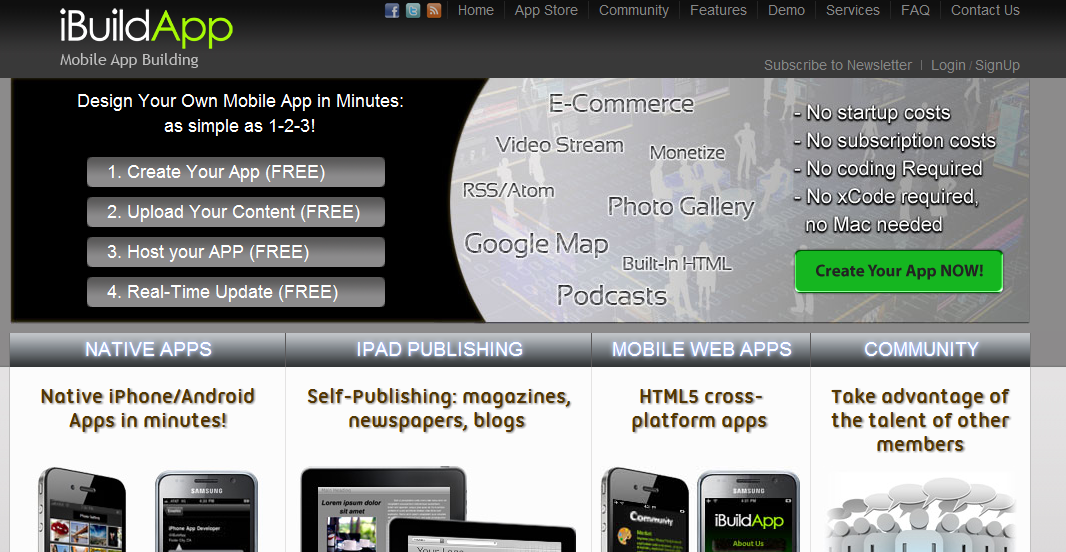
iBuildApp-Another one of the easy app builders, there are lots of features to choose from. Adding tap-to-call, Youtube channels, maps, Twitter feeds and more, the interface is slick and easy for even the novice user to develop. You can build an app for iOS or Android, however there are some associated developer fees that you will want to check out. 

Shoutem-Similar to the others, this has a few less features but when it comes time to publishing, you do save a little bit of money. Again, take your URL and in a few moments you have an app ready to publish. Create an app all at once for iOS and Android, give this one a try. 

Android App Inventor-Created by Google, this is now a project for MIT that aims at helping anyone who wants to create an app do it for free. Development happens all in your browser. While it is a bit more tricky than the others, it is easy enough to get the hang of because it its drag and drop. There are whole list of buttons, actions, and objects you can drag to the screen to create an app that was designed truly by you. This one I see working great in a Computer Science class and kids could develop all kids of apps. All you need to get started is a Google account. 

So you can get started right now and create an app for your school, your blog or, if you are feeling dangerous, design something from scratch. Do you have a favorite app designer or an app you designed with one? Leave a comment below. 

Tuesday, December 6, 2011

Quick List Of Mobile Apps For Administrators

When it comes to mobile learning there are loads of great sites for apps for kids and teachers. Everything from apps organized by Revised Bloom’s Taxonomy to apps organized by grade level and subject area. But what you might not know, especially if you are an administrator is that there are some great apps out there for you.

What are they? Well my administrator friend, here are my Top 9 Apps For Administrators

(All of these are for iPad but you can find many, or an equivalent, in the Android Market as well)

1) Google Docs-Where would I be with out Google Docs? Lost I am sure. My life is spent editing and creating documents, presentations and spreadsheets. And the ability to share those easily makes Google Docs my go-to app for editing, not only at the computer but on the go as well. I can edit, comment and view all my documents from this app, no matter where I am. So for the administrator, editing or viewing your school improvement plan, meeting agenda or walkthrough data can really increase productivity.

2) Dropbox-For those items I can’t keep in Google Docs, I use Dropbox. The app gives you access to all your files stored in the cloud so you can retrieve them, email them, view them, and show them, again, no matter where you are.

3) Adobe Ideas- You never know when a great idea is going to strike. Adobe Ideas is always at the ready to capture a drawing, sketch, list or what ever you need.

4) Pocket-I am a huge, huge fan of this app. Whenever you are reading a blog or come across a webpage that you just don’t have time to check out or don’t want to save it to your booksmarks before you have a chance to look at it, you can Pocket. Adding items to your list is easy as a checkmark in the address bar and the app gives you online and offline access to your entire list.

5) Skype-Desktop video calling is now available on the iPad. You can chat, make calls and even do free video calling, no matter where you are. Participate in a faculty meeting when you aren’t at school or meet virtually with other administrators to build your network. All on your iPad!

6) Zite-This is a Social Aggregator that takes topics you decide and pulls the most relevant stories related to those topics. They are then presenting and a pretty neat magazine format. And you can share what you read via Twitter, Facebook and email. So you can keep up with topics in education and share with your staff with ease.

7) Google Translate-In many of our schools English might not be the main language spoken. The Google Translate app is great for helping to break the language barrier with students and staff and you can put in text and get instant translations for emails and documents.

8) TED-These are inspiring talks given from some of the brightest minds on the planet. This app gives you access to the entire directory. You can use the TED talks build morale and challenge the thinking of your staff and students.

9) Dragon Dictation-Let’s face it, sometimes typing on the iPad can be challenging. Dragon Dictation does it all for you. Using the built-in mic you can dictate memos, documents, blog posts and more.

There are loads more apps out there for all different sorts of uses. Check out this post to learn more about how you can get more mileage out of your mobile learning device. 

Image Under CC License From joshfassbind